

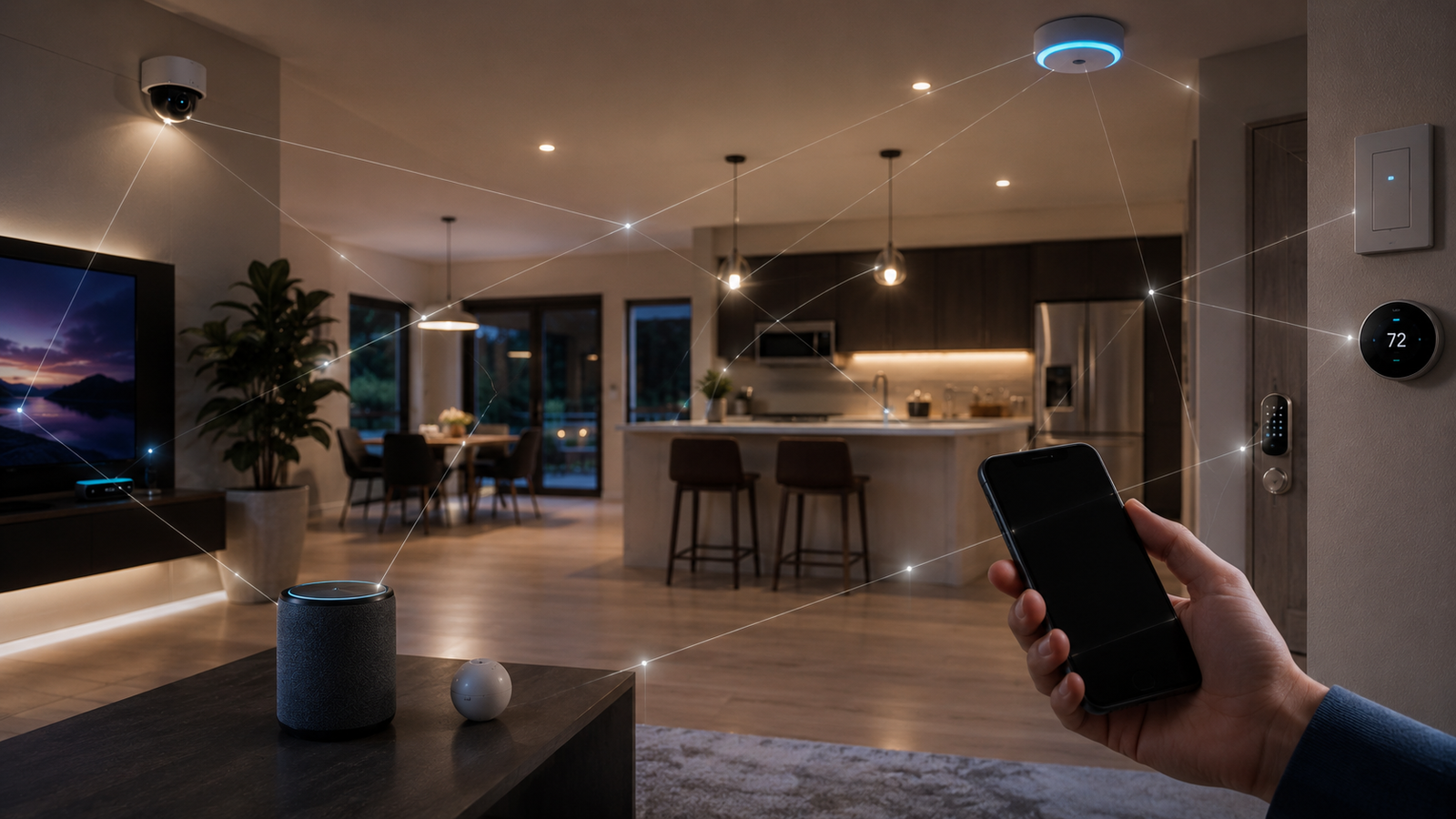
Imagine saying four words:
“Turn off the lights.”
You speak.
The lights turn off.
It feels simple. But behind those four words, several technologies may have worked together.
Your voice needs to be captured. The system needs to understand your request. That request needs to become a digital command. The command needs to reach the correct device. The light needs to understand the instruction and change its electrical state.
All of this can happen within seconds.
This is the basic idea behind how smart home devices communicate.
Lights, thermostats, locks, cameras, speakers, appliances, sensors, smartphones, and controllers can communicate through different networks and protocols. The goal is to make many separate devices operate as one coordinated system.
But how can devices from different manufacturers work together?
The answer becomes clearer when you look at the layers underneath the simple experience.
What Does a Smart Home Need to Communicate?
Before smart devices can cooperate, they need ways to exchange information.
A connected home can involve:
- Wireless or wired networks
- Communication protocols
- Sensors and devices
- Controllers or hubs
- Software
- Automation rules
- Security mechanisms
- Cloud services
These technologies do different jobs.
Wi-Fi provides high-bandwidth networking. Bluetooth provides short-range communication and can assist with device setup. Thread provides low-power mesh networking. Zigbee and Z-Wave support established smart-home ecosystems. Matter provides an application-level framework designed to improve interoperability between compatible devices and ecosystems.
The important point is that there is no single technology responsible for everything.
How Does Wi-Fi Fit Into a Smart Home?
Wi-Fi is one of the most familiar technologies in a connected home.
Your router creates a local network. Your phone can connect to it. So can a television, appliance, camera, or other smart device.
Wi-Fi is particularly useful when a device needs more bandwidth.
A security camera may transmit video. A streaming device may require high throughput. Some appliances may communicate regularly with network services.
But not every device needs that much capacity.
A small door sensor may only need to send a small amount of information. A battery-powered device may need to operate for months or years.
Using Wi-Fi for every smart device would therefore not always be the most efficient approach.
What Are Bluetooth, Thread, Zigbee, and Z-Wave?
Bluetooth provides short-range wireless communication. Bluetooth Low Energy can also assist with smart-device setup and commissioning.
Thread is different. It is a low-power wireless mesh networking protocol designed for connected devices. It is particularly useful for sensors, locks, switches, and other devices that do not require high data throughput.
Zigbee is another low-power wireless technology used in smart-home and IoT products.
Z-Wave is another established technology used for home automation, including locks, switches, sensors, and thermostats.
These technologies can coexist in the same home, but they do not automatically understand one another.
That creates one of the biggest challenges in smart-home technology: interoperability.
Why Is Mesh Networking Useful?
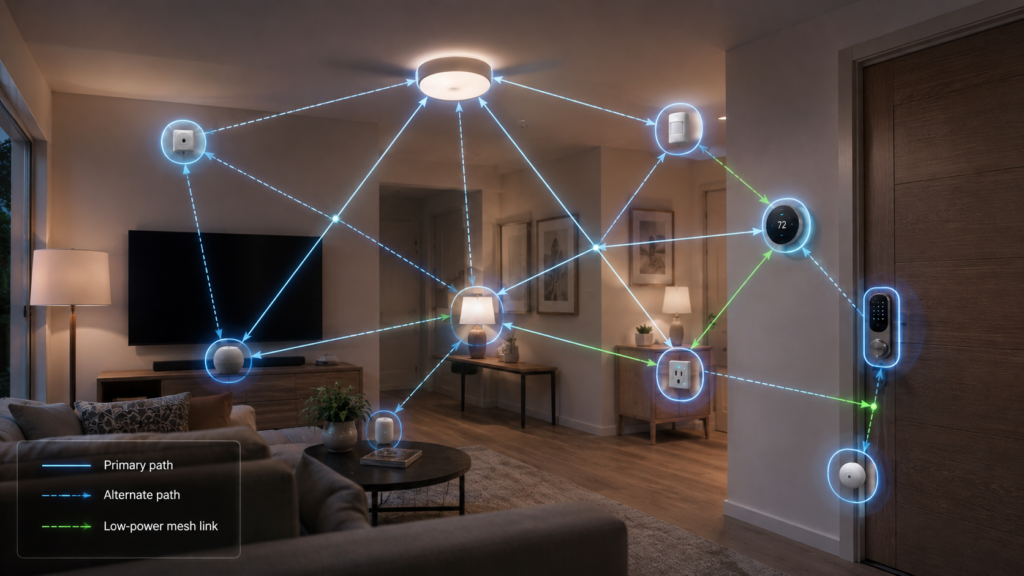
Imagine a sensor in an upstairs room and a smart light downstairs.
A direct wireless connection to the main router may not always be ideal.
In a mesh network, compatible powered devices can help route information between one another.
This creates alternative communication paths.
If one path becomes unavailable, another may remain available.
Thread is designed around this low-power mesh approach.
Mesh networking does not eliminate every problem. Radio interference, physical obstacles, power failures, device placement, and configuration issues can still affect communication.
Its advantage is that compatible devices can cooperate to create a more resilient network.
What Is Smart Home Interoperability?
Imagine your home contains a smart bulb from one manufacturer, a door sensor from another, a thermostat from a third, and a smart speaker from a fourth.
You want them to work together.
Without common standards, every manufacturer could create its own communication system.
That would make the smart home increasingly difficult to manage.
Interoperability means compatible devices can participate in a common system even when they come from different manufacturers.
This is one of the problems Matter was designed to address.
What Is Matter?
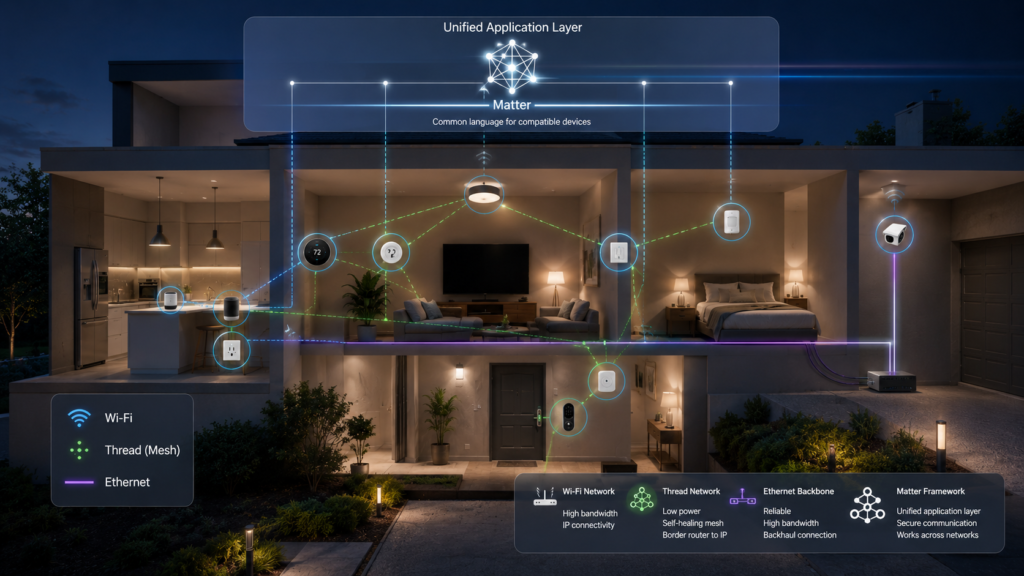
Matter is an open smart-home application protocol designed to improve interoperability between compatible devices and ecosystems.
It can operate over Wi-Fi, Thread, and Ethernet.
Bridges can also allow compatible devices using other technologies to participate in Matter ecosystems.
This distinction is important because Matter is not another replacement for Wi-Fi or Thread.
Wi-Fi and Thread provide ways for information to move.
Matter provides a standardized application-level framework that helps compatible devices communicate what they are and what they can do.
A simple analogy helps.
Think of Wi-Fi, Thread, and Ethernet as different roads.
Matter provides a standardized language for the devices traveling over those roads.
The technologies complement one another.
How Does a Smart Home Turn Information Into Action?
Consider this automation:
“If motion is detected after sunset, turn on the hallway light.”
A motion sensor detects movement.
The sensor sends information through the network.
A controller or automation system receives it.
The system checks the rule and determines that it is after sunset.
It sends a command to the light.
The light changes state.
What looks like one simple action actually involves a sensor, network, controller, automation rule, and device.
This is the basic feedback loop of a connected home:
- Measure.
- Compare.
- Act.
- Measure again.
What Is a Smart Home Scene?
Automation can coordinate several devices at once.
Imagine pressing a “Good Night” command.
The system could turn off lights, change the thermostat, lock doors, close curtains, and switch off selected appliances.
A scene is therefore a coordinated collection of actions.
Instead of controlling five devices separately, one command can change the state of several devices.
This is one reason a connected home can feel like a single system rather than a collection of independent gadgets.
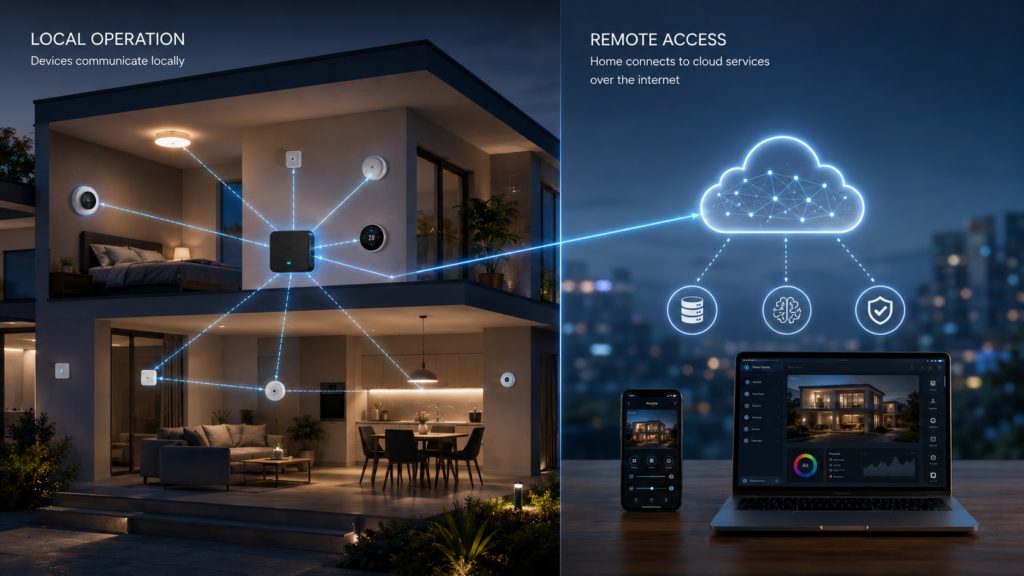
Does a Smart Home Need the Internet?
Not necessarily.
Some smart-home actions can occur entirely within the local network.
A sensor can communicate with a local controller. The controller can send a command to a light. The action does not necessarily need to travel to a remote cloud server.
Local operation can reduce latency and allow some functions to continue during an internet outage.
But behavior depends on the specific devices and platform.
Cloud-dependent functions may stop working when the internet connection is unavailable.
Your home network and your internet connection are therefore not the same thing.
What Is Cloud Control?
Cloud services allow some smart-home functions to operate through remote servers.
Imagine controlling your home while you are away.
Your phone sends a request through the internet.
A cloud service receives the request and processes it.
The command then travels back toward your home.
The device responds.
Cloud services can support remote control, notifications, camera access, and additional computing capabilities.
The tradeoff is dependence on network connectivity.
For some functions, that is acceptable.
For others, local control may be more reliable.
What Is a Smart Home Hub?
A hub or controller coordinates communication between smart-home devices.
Traditional hubs became common because different technologies required specialized controllers.
A hub could communicate with Zigbee devices, Z-Wave devices, Wi-Fi devices, smartphones, and cloud services.
Modern smart-home architecture can reduce the need for a separate traditional hub in some configurations.
Thread introduces another concept, the Thread Border Router.
A Thread Border Router connects a Thread network with other IP networks such as Wi-Fi or Ethernet.
It performs a networking role rather than simply translating one proprietary application system into another.
This distinction helps explain how modern smart-home networks are becoming more integrated.
How Does a Smart Home Discover a New Device?
Imagine buying a new smart light.
The system needs to identify the device, establish a secure connection, provide the required network information, add the device to the appropriate ecosystem, and make its capabilities available to the controller.
This process is called commissioning.
Matter includes standardized approaches intended to simplify setup across compatible ecosystems.
The important idea is that adding a device is more than simply connecting it to Wi-Fi.
The system needs to establish identity, security, capabilities, and control.
How Does the System Know Which Device You Mean?
Consider the command: “Turn off the bedroom light.”
The system needs to identify the correct room and device.
It needs information about the device and its capabilities.
A light may report whether it is on or off, its brightness, and possibly its color.
A thermostat may report its current temperature, target temperature, and operating mode.
A lock may report whether it is locked or unlocked.
This information is called device state.
Device state helps the smart-home system understand what is happening and determine whether a command produced the expected result.
What Happens When Something Fails?
Smart homes depend on many components.
A light can lose power.
A sensor battery can die.
A network connection can disappear.
A controller can become unavailable.
A reliable system needs to distinguish between a successful command and a device that is simply unreachable.
Communication status and device state help the system determine what actually happened.
This becomes particularly important for devices such as locks, security systems, and other equipment where failure matters more than a light failing to turn on.
How Does Voice Control Work?
Return to the original command: “Turn off the bedroom light.”
The process can involve several steps.
A microphone captures your voice.
Speech recognition processes the audio.
An assistant interprets the request.
The system identifies the intended device.
A command travels through the appropriate network.
The light receives the command.
The light changes state.
What sounds like one action is actually a chain of digital operations.
Why Is Security Important?
A smart home can control physical devices.
These can include:
- Locks
- Cameras
- Alarms
- Garage doors
- Heating systems
- Security sensors
These devices should not accept commands from unauthorized users.
Authentication helps establish whether a device or controller is authorized.
Encryption helps protect information while it travels between systems.
Secure protocols help protect the network itself.
Security therefore has to be part of the communication architecture rather than an afterthought.
Why Does Smart Home Privacy Matter?
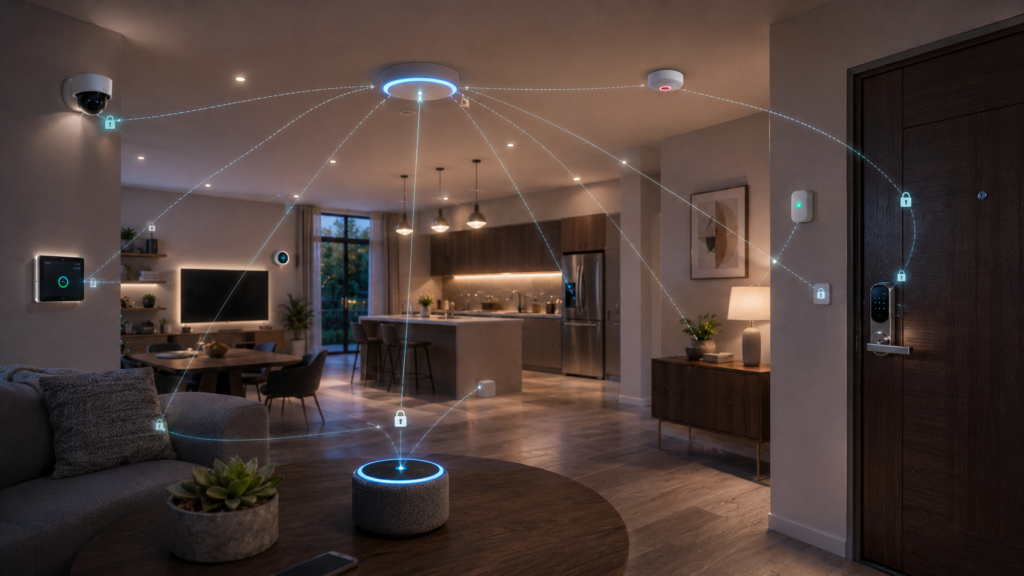
Connected devices can generate information about everyday life.
They may reveal when you enter or leave your home, when doors open, when lights turn on, temperature preferences, camera activity, or voice commands.
Those patterns can reveal more than a single device action.
Local processing can reduce the amount of information that leaves the home.
Strong authentication can restrict access.
Encryption can protect communication.
Data minimization can reduce unnecessary collection.
You should also understand which features depend on cloud services.
The more connected your home becomes, the more important it becomes to understand where its data goes.
How Does AI Fit Into a Smart Home?
Traditional automation can follow simple rules.
“If motion is detected after sunset, turn on the light.”
AI can potentially handle more complex patterns.
It can help classify movement, summarize events, interpret natural-language requests, or assist users in creating automations.
But AI does not replace the underlying network.
The network moves information.
AI can interpret or predict.
Automation turns conditions into actions.
These functions work together.
Why Do Smart Homes Use Multiple Networks?
Different devices have different requirements.
A security camera may need substantial bandwidth.
A door sensor may send only a small amount of data.
A battery-powered lock needs efficient communication.
A television requires high throughput.
A smart home can therefore use several communication technologies simultaneously.
For example:
- A camera may use Wi-Fi.
- A door sensor may use Thread.
- A legacy device may use Zigbee.
- A smartphone may use Wi-Fi or cellular connectivity.
- Matter can provide the application-level framework for compatible devices.
The result is a layered communication system.
What Happens to Older Smart Home Devices?
Matter is newer than many technologies already installed in homes.
Replacing every older device would be impractical.
Bridges can provide a migration path by allowing compatible technologies such as Zigbee and Z-Wave to participate in Matter ecosystems.
This allows existing devices to remain useful while newer products adopt newer standards.
However, Matter does not guarantee that every feature of every device will work across every platform.
Compatibility still depends on device capabilities, certification, software versions, and ecosystem support.
What Is the Future of the Smart Home?
The smart home is moving toward greater coordination between devices.
A home can collect information about temperature, light, motion, presence, energy use, security status, and time.
The system can then respond.
You might leave home and have the lights turn off, the doors lock, the thermostat change, and security systems activate.
When you return, the home can change state again.
The important technology is not one particular gadget.
It is the communication system connecting many devices.
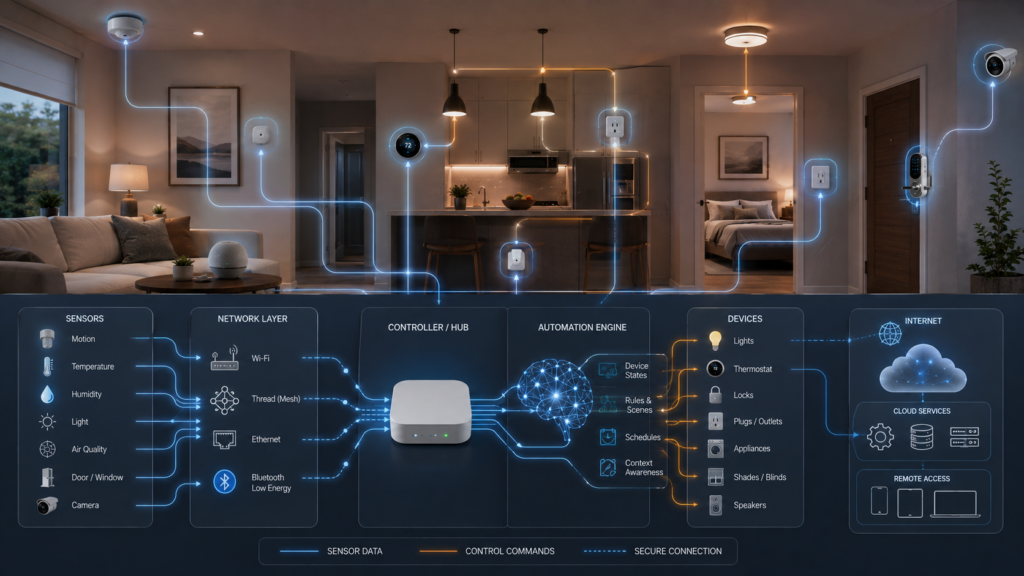
The Complete Smart Home Communication Loop
Return to those four words:
“Turn off the lights.”
You speak.
A microphone captures your voice.
Speech recognition processes it.
An assistant interprets the request.
The system identifies the intended device.
A controller determines how to reach it.
The command travels through the appropriate network.
The light receives the instruction.
Its controller changes the electrical state.
The light turns off.
The process may take only a moment.
But underneath that simple experience are networks, protocols, device identities, security mechanisms, controllers, automation rules, and device states.
That is how smart-home devices communicate.
Key Takeaways
- Smart homes use multiple communication technologies because different devices have different requirements.
- Wi-Fi is useful for devices that require higher bandwidth.
- Bluetooth can provide short-range communication and assist with device setup.
- Thread provides low-power mesh networking for compatible connected devices.
- Zigbee and Z-Wave remain important technologies in established smart-home ecosystems.
- Matter operates at the application level and is designed to improve interoperability between compatible devices and ecosystems.
- Sensors provide information that automation systems can use to trigger actions.
- Local processing can allow some smart-home functions to continue when the internet is unavailable.
- Cloud services can provide remote access and additional computing capabilities.
- Hubs, controllers, and Thread Border Routers help coordinate communication between different parts of a smart-home network.
- Security and privacy become increasingly important as connected devices collect and exchange more information.
- The smart home works as a layered system in which networks move information, protocols define communication, controllers coordinate devices, and automation turns information into action.
Conclusion
A smart home does not work because every device speaks exactly the same language.
It works because several layers of technology allow different devices to communicate.
- Wi-Fi provides one type of network.
- Thread provides another.
- Bluetooth can assist with setup.
- Zigbee and Z-Wave support established ecosystems.
- Matter provides an application-level framework for compatible devices.
- Controllers coordinate the system.
- Cloud services can provide remote access.
- Local systems can keep some functions operating inside the home.
- Security protects the communication.
- Automation turns information into action.
The result is a home that can sense, communicate, and respond.
A sensor detects movement. A thermostat measures temperature. A camera detects activity. A controller processes the information. An automation rule determines what should happen. A device performs the action. The system checks the result.
Measure.
Communicate.
Decide.
Act.
Repeat.
The technology becomes increasingly invisible.
You do not need to think about Thread, Wi-Fi, Matter, or device states every time you turn on a light.
You simply expect the light to work.
But behind that simple experience, a miniature digital ecosystem is operating throughout your home.
The home is becoming less like a collection of separate appliances and more like one connected system.
That is the technology that makes a smart home possible.
Explore more evidence-based explanations of everyday life and practical science in CAVELYRA‘s Practical Living collection.